Client onboarding automation - what to keep human

Automate the operational steps of client onboarding (document requests, payment collection, reminders, and status updates) and keep the relationship steps human: kickoff calls, scope discussions, and anything that requires judgment. For a service business onboarding 8 to 10 clients per month, this split saves 15 to 25 hours of administrative time. The document collection savings alone are stark: a Content Snare customer survey found a 71% reduction in collection time when businesses switch from email to structured, automated requests: from a median of 25 hours per month down to just over 5.
Most automation advice targets enterprise teams with Salesforce instances and dedicated ops staff. That is not you. Service businesses with 3 to 20 people (the ones following our onboarding guide) need a different playbook. Nobody here has a RevOps team building Zapier workflows. You have a founder who's also the project manager and the account manager. The same founder sends "just checking in on those bank statements" emails at 9 PM. The decision matrix below draws the line between what a machine should handle and what still needs you. Then it walks you through the first two automations, which take an afternoon.
The Automation Decision Matrix
Every client onboarding step falls into one of three categories: fully automate, semi-automate, or keep manual. The dividing line is not subtle. Notification, reminder, data transfer: automate it. Reading the room, adjusting scope, building trust: keep it human. One category sits in between: a personalized message triggered by an automated event. Semi-automate those. The timing fires on its own. A person still writes the words.
The rule for deciding what to automate: if the step requires judgment, empathy, or negotiation, keep it human. If it's a reminder, a request, or a notification, automate it. Semi-automate the steps that need a human touch but follow a predictable trigger, like a personalized welcome message sent after contract signature, where the timing is automated but the content is written by a person.
This matrix covers the standard client onboarding checklist phases. The copy-ready client onboarding checklist template is the manual version of the same steps. Adapt it to your service type. A bookkeeping firm and a brand agency weight the columns differently. The logic underneath does not move.
| Onboarding Step | Automate | Semi-Automate | Keep Manual | Why |
|---|---|---|---|---|
| Welcome email | ✅ | Triggered by contract signature. Same content every time. | ||
| Document collection requests | ✅ | Structured request with per-item fields. No judgment needed. | ||
| Document reminders (48h, 5d, 7d) | ✅ | Timed escalation. A machine does this better than a person. | ||
| Payment / invoice | ✅ | Embed in the onboarding flow. No awkward separate ask. | ||
| Status updates to client | ✅ | "Your onboarding is 60% complete." Pure data. | ||
| Internal team notifications | ✅ | "Client X completed intake." Route to the right person. | ||
| Personalized welcome message | ✅ | Trigger is automated; content is written by you. | ||
| Kickoff call scheduling | ✅ | Use a scheduling link, but the call itself is live. | ||
| Intake forms delivery | ✅ | Form is templated; which form to send may depend on service type. | ||
| Kickoff call / first meeting | ✅ | First impression. Clients hired a person. | ||
| Scope and pricing discussion | ✅ | Requires negotiation and judgment. | ||
| Relationship check-ins | ✅ | "How's everything going?" needs to come from a human. | ||
| Exception handling | ✅ | When something goes wrong, a bot makes it worse. |
Six steps automated. Three semi-automated. Four manual. That ratio (roughly half automated, a quarter assisted, a quarter human) holds across agencies, bookkeeping firms, consultants, and coaching practices.
Five Onboarding Steps to Fully Automate
These five steps eat the most administrative time and benefit the most from automation. Each one repeats, and none of them asks you to make a call. That is the whole test for a good automation candidate. According to Zapier's automation statistics, 90% of small businesses are already considering automation to improve their operations (Visa, 2023). HubSpot's service research found that 92% of service leaders report automation has improved their response quality (HubSpot State of Service, 2024). Awareness is not the gap. Knowing where to start is.
1. Welcome Emails
Trigger a welcome email the moment a client signs their contract. Include a summary of what happens next, a timeline, and the name of their primary contact. It should land within 5 minutes of signature. Not the next morning, when you finally remember.
The welcome email sets expectations for the entire engagement. Put in next steps with dates, your contact info, and a link to the intake form or document request. Leave out anything that requires per-client customization. Rewriting this email for every client is not diligence. It is a broken template.
2. Document Collection With Auto-Reminders
This is where automation pays for itself fastest. The Content Snare customer survey found that businesses cut document collection from a median of 25 hours per month to just over 5 hours. The switch was from email to structured collection with automated reminders. That's 20 hours back every month.
Set up a three-stage automated reminder cadence:
- 48 hours: Friendly nudge. "Just a reminder: 3 items are still outstanding."
- 5 days: Direct. "We need these documents to start your [service]. Here's what's missing."
- 7 days: Escalation. "Your project start date will be delayed until we receive these items."
For a deeper look at structuring document requests with tiered deadlines, see our guide on how to collect documents from clients without the chaos.
3. Payment Collection
Embed payment as a step in the onboarding flow, not a separate email sent after everything else. When a client signs their contract, the next screen or the next email carries the invoice or payment link. That kills the awkward "by the way, here's your bill" message three days later. It also cuts late payments, because the gap between agreement and transaction is where late payments live.
4. Status Notifications
Send the client automatic updates as they complete onboarding milestones. "Your contract is signed. Next step: document upload." "3 of 8 documents received." "Your onboarding is complete. Your kickoff call is scheduled for Thursday." They cost nothing to send. They also answer the "what happens now?" question before the client feels it. That anxiety is what produces the status emails you should not be writing by hand.
5. Internal Team Handoffs
When a client finishes intake, notify the team member who handles the next phase. When documents are complete, notify the person who starts the work. When payment clears, notify finance. The most common onboarding bottleneck is not a slow client. It is a finished file that nobody knew was finished, sitting in limbo. Internal notifications end that.
The five steps worth fully automating are: welcome emails, document collection with tiered reminders, payment processing, client-facing status updates, and internal team handoffs. A Content Snare survey found that structured collection with automated reminders alone cuts document-gathering from 25 hours per month to 5 (a 71% reduction). Automating the remaining four steps eliminates another 5 to 10 hours of emails, notifications, and manual routing each month.
Four Steps That Must Stay Human
Automation fails when it tries to replace judgment, empathy, or negotiation. Wyzowl's onboarding research found that 63% of customers factor a company's onboarding experience into their purchase decision. The human moments shape that experience. The automated ones do not. No client ever said "I chose that firm because their reminder emails were great." They chose you because the first call felt right.
The kickoff call. The sales relationship is over. This is the first hour of the working one. The client is still deciding whether they chose well. A call that feels templated or rushed answers that question for them, badly. Reference their intake form answers. Show that you've already started thinking about their situation.
Scope and pricing discussions. These run on signals the client never says out loud. "We might want to add tax prep later" means they want tax prep now but are price-sensitive. An automated upsell sequence hears none of that.
Relationship check-ins. A week after kickoff, check in. Not with a template. With a genuine question about how the process felt. This is where problems get caught before they turn into complaints. It is also where referrals come from.
Exception handling. When a document is wrong, a payment fails, or a deadline slips, the client needs a human response. An automated "your payment failed, please update your card" email is fine for a streaming service. For a client paying you $3,000/month for bookkeeping, pick up the phone.
A Real Onboarding Workflow, Automated
Here is a complete automated onboarding workflow for a bookkeeping firm taking on a new client at $500/month. Each step shows the trigger, the action, and whether it's automated (A), semi-automated (SA), or manual (M). Steps 1-9 run without anyone touching them.
| Step | Trigger | Action | Type |
|---|---|---|---|
| 1 | Client signs engagement letter | Send welcome email with timeline and intake form link | A |
| 2 | Welcome email sent | Create client folder in project management tool | A |
| 3 | Welcome email sent | Notify assigned bookkeeper: "New client — review intake when complete" | A |
| 4 | Client submits intake form | Send document request: W-9, bank statements (3 months), prior year tax return, accounting software login | A |
| 5 | Document request sent | Send invoice for first month ($500) | A |
| 6 | 48 hours after document request | If incomplete: send reminder #1 (friendly) | A |
| 7 | 5 days after document request | If incomplete: send reminder #2 (direct) | A |
| 8 | 7 days after document request | If incomplete: send reminder #3 (escalation) + notify bookkeeper | A |
| 9 | All documents received | Notify bookkeeper: "Documents complete — ready for kickoff" | A |
| 10 | All documents received | Send client: "Onboarding complete. [Name] will schedule your kickoff call." | SA |
| 11 | Bookkeeper reviews documents | Schedule and conduct kickoff call | M |
| 12 | 7 days after kickoff | Relationship check-in: "How's everything going?" | M |
For a firm onboarding 8 clients per month, this workflow eliminates roughly 40 manual emails per month. That is the welcome, the document requests, the reminders, the status updates, and the internal notifications. It saves 2 to 3 hours of administrative time per client. Call it 16 to 24 hours a month, handed back for actual bookkeeping.
An automated bookkeeping onboarding workflow has 12 steps: 9 fully automated (welcome email, document requests, payment, three reminder stages, internal notifications), 1 semi-automated (personalized completion message), and 2 manual (kickoff call, relationship check-in). For a firm onboarding 8 clients per month, this eliminates roughly 40 manual emails and saves 16 to 24 hours monthly. That time goes back to billable client work.
The same structure adapts to other service types. An agency replaces "W-9 and bank statements" with "brand guidelines and creative assets". See the full agency onboarding process for the agency-specific workflow. A consultant replaces "accounting software login" with "project management access." The triggers and cadence stay the same. Only the document list and the kickoff agenda change.
How to Start Automating This Afternoon
Do not build the full 12-step workflow on day one. Take the single step that costs you the most time. Automate that one. Expand later. For most service businesses, that step is document collection: the phase with the most follow-up emails and the most hours lost to chasing clients for information.
Step 1: Audit your last 5 client onboardings. Count the emails you sent for each one. Categorize them: document requests, reminders, welcome messages, payment-related, status updates, internal coordination. The category with the highest count is your starting point.
Step 2: Set up automated document collection. Choose a tool (see comparison below). Build a document request template for your most common service. Configure a three-stage reminder cadence (48 hours, 5 days, 7 days). Send it to your next new client instead of the usual email chain.
Step 3: Add the welcome email. Write one template. Set it to trigger on contract signature. Include next steps, timeline, and a link to the document request from Step 2.
Step 4: Measure the difference. After 5 clients, count emails again. Compare total onboarding administration time before and after. The data tells you what to automate next.
Going one step at a time avoids one of the most common client onboarding mistakes: overhauling everything at once, then abandoning it halfway.
Tools for Client Onboarding Automation
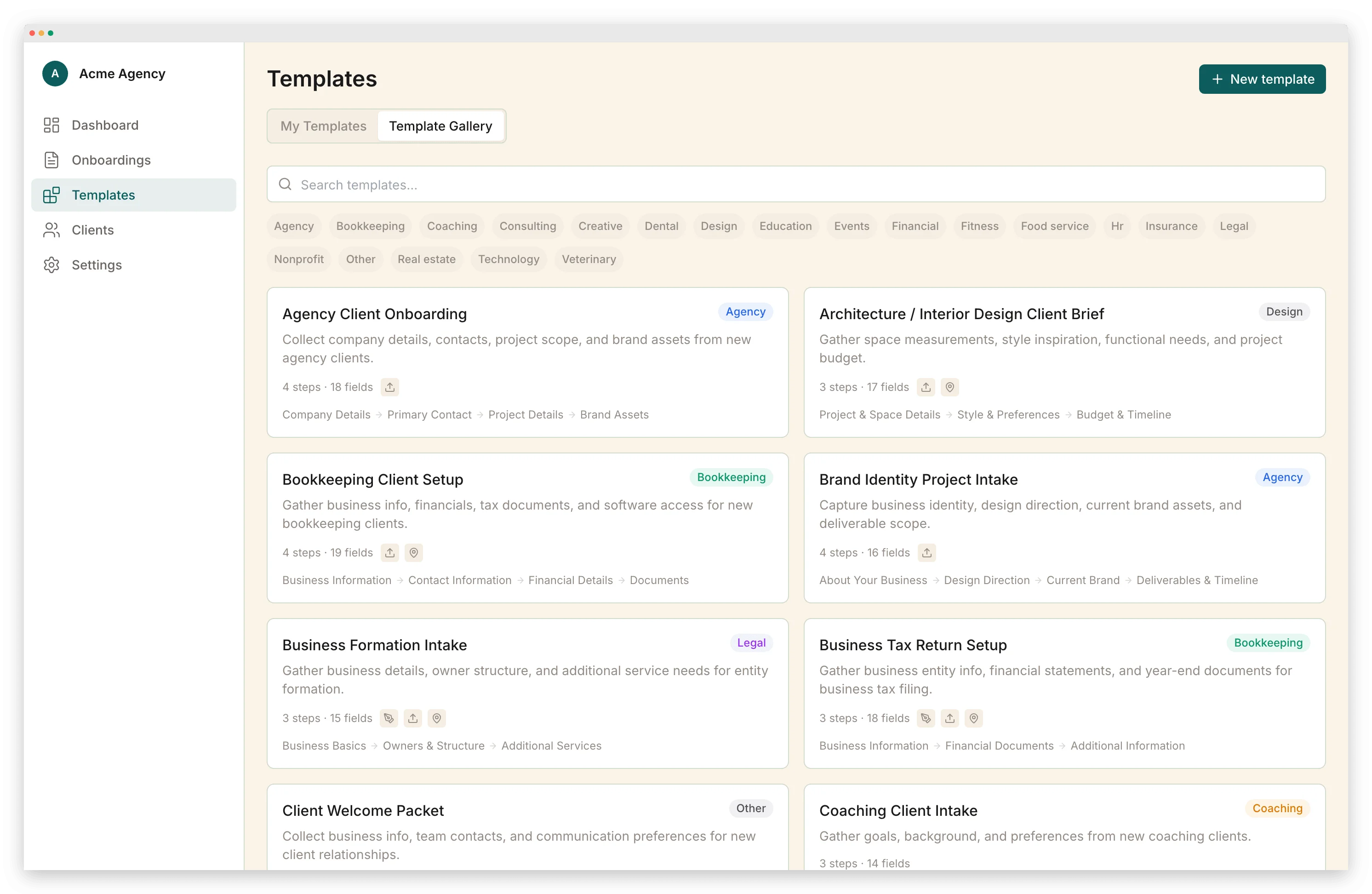
Three categories of tools handle onboarding automation, each with different tradeoffs for service businesses.
| Category | Examples | Best For | Limitations |
|---|---|---|---|
| Dedicated onboarding platforms | This site, Content Snare, Clustdoc | Service businesses doing 5+ onboardings/month who want one workflow for forms, documents, payments, and communication | Less useful if you need a full CRM or project management suite |
| All-in-one CRMs | HoneyBook, Dubsado | Solo practitioners or small teams who want contracts, invoicing, and onboarding in one place | Onboarding features are less specialized; can feel bloated if you only need onboarding |
| DIY stacks | Zapier + Google Forms + Stripe + email | Teams with technical staff who want full control and already use these tools | High setup time, ongoing maintenance, no unified client experience |
The dedicated platform on this site (/client-onboarding-software) handles automated onboarding workflows with conditional triggers, timed reminders, and progress tracking. The document collection, payment, and status notification steps from the workflow above run natively. There are no external tools to connect. Content Snare sticks to document and information gathering. HoneyBook and Dubsado bundle onboarding into broader client management suites that also cover proposals, contracts, and scheduling.
The right choice depends on volume. If you onboard 2 clients per month, a CRM with basic automation is sufficient. You may not need dedicated software at all. At 5+ clients per month, the time saved by a dedicated platform pays for itself within the first month.
For service businesses onboarding 5+ clients per month, a dedicated onboarding platform saves more time than a DIY stack (no maintenance) and offers better onboarding features than a general CRM (purpose-built workflows). Below 5 clients per month, a CRM with basic automation handles the load. Above 5, the administrative savings from automated reminders, structured document collection, and integrated payments offset the platform cost within weeks.
Frequently Asked Questions
What parts of client onboarding can be automated?
Five onboarding steps are safe to fully automate: (1) Welcome emails triggered by contract signature. (2) Document collection requests with automatic reminders at 48 hours, 5 days, and 7 days. (3) Payment processing: send the invoice or collect the payment as part of the onboarding flow. (4) Status notifications that tell the client their onboarding is 60% complete. (5) Internal handoffs that notify your team when a client completes intake. Keep the kickoff call, scope discussion, and relationship check-ins human.
How do I automate client onboarding for a small business?
Start with the step that eats the most time: usually document collection or payment chasing. Set up a tool that sends a structured request with automatic reminders. Then add a welcome email triggered by contract signature. These two automations alone save 2 to 4 hours per client for a typical service business. Only expand to more complex workflows (conditional logic, multi-step sequences) after the basics are working.
What should I not automate in client onboarding?
Never automate the kickoff call or first meeting, scope negotiations, pricing discussions, or the moment when something goes wrong. Clients hired a person, not a robot. Automated welcome emails are fine. Automated responses to client concerns are not. A good rule: if the step requires judgment, empathy, or negotiation, keep it human. If it is a reminder, a request, or a notification, automate it.
What tools automate client onboarding?
Tools fall into three categories: (1) Dedicated onboarding platforms like Content Snare and Clustdoc that handle the full workflow. (2) All-in-one CRMs like HoneyBook and Dubsado that include onboarding alongside contracts, proposals, and scheduling. (3) DIY stacks built on Zapier, Google Forms, and email sequences. Dedicated platforms are the best fit for service businesses doing 5+ onboardings per month: faster to set up than a DIY stack and more focused than a CRM.
How much time does onboarding automation save?
For a service business onboarding 8 to 10 clients per month, automating document collection, reminders, and welcome emails saves 15 to 25 hours per month. The biggest savings come from eliminating follow-up emails: a Content Snare customer survey found that businesses cut document collection time from 25 hours per month to just over 5 hours after switching to structured collection with automated reminders (a 71% reduction).
Vlad Kuzin
Founder of Portico. Former content systems architect. Obsessed with removing friction from client workflows.
Onboard your next client with one link
Intake forms, documents, e-signatures, and payments in a single guided flow.
Start FreeNo credit card required. Cancel anytime.