Client onboarding checklist - 7 phases (free)

A client onboarding checklist for service businesses should cover seven phases: pre-onboarding prep, contracts, client intake, document collection, payment setup, welcome communication, and 30-day follow-up. Skip any one of these and you get the same failure modes: unsigned contracts sitting in inboxes, missing documents delaying project starts, and radio silence that makes new clients regret signing.
According to Wyzowl's onboarding research, 63% of customers consider a company's onboarding process when making a purchase decision, and 90% feel that companies could do better at onboarding. For service businesses (agencies, bookkeeping firms, consultants, coaches), onboarding is not a product walkthrough or a tooltip tour. Someone just agreed to pay you money. Onboarding is what turns that person into a client who trusts you, has given you everything you need, and knows what happens next.
This checklist covers every phase with specific action items, conditional steps by industry, and the exact sequence that prevents the most common onboarding failures. If you have ever lost a client in the first 60 days and could not name the cause, it is probably on this list. For the reasoning behind each phase and how to build an onboarding process from scratch, see the client onboarding guide.
What a Client Onboarding Checklist Needs to Cover
A client onboarding checklist needs to cover every handoff between you and the client: every point where information, money, or a document moves from one side to the other. Most checklists you'll find online list 5 to 6 generic steps and call it done. The problem is not the steps. It's the gaps between them.
Take a missed W-9. Your bookkeeper cannot file, the client gets a panicked email in March, and you look disorganized. An unsigned contract leaves scope undefended, so when the client says "can you also..." you have nothing to point at. A forgotten welcome email leaves the client sitting in silence for three days, wondering whether they picked wrong.
The seven phases of client onboarding are: (1) pre-onboarding prep, (2) contracts and agreements, (3) client intake, (4) document collection, (5) payment setup, (6) welcome communication and kickoff, and (7) first 30-day follow-up. Each phase has a specific output (a signed contract, a completed form, a collected file) and a trigger that starts the next phase. The checklist works because it treats onboarding as a workflow, not a to-do list.
The seven phases below are ordered by dependency. Contracts come first because you need legal protection before you collect business data. Intake comes next, since the form tells you which documents to request. Payment happens early because unsettled money makes every later conversation slightly awkward. The 30-day follow-up exists because onboarding does not end when the kickoff call does.
Phase 1: Pre-Onboarding Prep
Pre-onboarding prep is everything you do internally before the client signs anything. The goal is zero delay between "yes, let's do it" and "here's your contract." According to Harvard Business Review, acquiring a new customer costs 5 to 25 times more than retaining one. The fastest way to lose a new client is a slow, disorganized start.
Internal setup:
- Create the client record in your CRM or project management tool. Company name, primary contact, email, phone, service package, and engagement start date.
- Assign an owner. One person owns this client's onboarding. Even if you're solo, put your own name on it so the system says so.
- Prepare the contract. Customize your template with the agreed scope, timeline, deliverables, and pricing. Generic contracts signal that you did not listen during the sales conversation.
- Set up billing. Know the exact amount, payment schedule, accepted methods, and the due date for the first payment before you send the contract.
- Create a project folder with subfolders: client documents, deliverables, internal notes, signed agreements.
Client-facing materials to prepare:
- Welcome packet: a one-page document covering what the client can expect: timeline, milestones, how to contact you, and what you'll need from them.
- Intake form: the questionnaire the client fills out with the information you need to start work.
- Document request list: every file, credential, or asset the client must provide, with format requirements and deadlines.
Phase 2: Contracts and Agreements
Nothing starts without a signed contract. It protects both sides and sets the legal floor for the engagement. It is also the first real evidence of how you work. A clean, clear agreement that arrives within hours of the verbal "yes" builds confidence. One that shows up four days later with typos spends it.
- Send the contract with clear terms: scope, payment schedule, intellectual property ownership, confidentiality, termination clause, liability limitations.
- Include e-signature. Do not ask clients to print, sign, scan, and email a PDF. It's 2026.
- Set a signing deadline. Give the client 48 to 72 hours. After that, send one follow-up. If you're still waiting at day five, something is wrong with the deal, not the contract.
- Countersign within 24 hours and send the fully executed copy back to the client.
- Store the signed contract in the client's project folder where you can find it in under 30 seconds.
Bundle additional agreements. If the engagement requires NDAs, data processing agreements, or subcontractor authorizations, attach them to the main contract. Do not drip-feed paperwork across multiple emails. Clients lose track, and so will you.
Industry-specific additions:
- Agencies: Include IP assignment clauses for creative work and specify who owns source files.
- Bookkeepers: Add an engagement letter specifying the exact services covered (bookkeeping vs. tax prep vs. advisory) and IRS Circular 230 disclosures where required.
- Consultants: Define deliverable formats and the number of revision rounds included in scope.
- Coaches: Include a disclaimer that coaching is not therapy, and clarify cancellation/rescheduling policies for sessions.
Phase 3: Client Intake
Client intake is where you collect the information you need to do the work. Collect it in one pass. Otherwise you spend the weeks afterward chasing the client for pieces. A well-designed intake form takes the client 10 to 20 minutes to complete and gives you enough context to start without a single follow-up email.
Intake form design principles:
- Ask only what you need to start. Everything else can wait. A 45-field form on day one buries the client and drops your completion rate.
- Use conditional logic. If a question only applies to certain service tiers or industries, show it only to those clients. A bookkeeping client does not need to answer questions about brand guidelines.
- Group questions by topic. Contact information first, then business details, then project-specific questions.
- Validate inputs. Require email format for email fields, phone format for phone numbers. Prevent bad data at the source.
- Explain what you need and why. For any question that might be ambiguous, add a one-line helper. "Upload your logo as SVG or PNG (minimum 1000px wide)" is clear. "Upload your logo" is not.
Intake Fields by Industry
The information you collect during intake varies by the type of service you provide. The table below shows the core fields for four common service business types.
| Category | Agency | Bookkeeper | Consultant | Coach |
|---|---|---|---|---|
| Business info | Company name, industry, team size, website URL | Legal entity type, EIN/tax ID, fiscal year end, state of incorporation | Company name, department, number of stakeholders | Full name, occupation, location |
| Access and credentials | CMS login, ad platform access, social media accounts, analytics | QuickBooks/Xero login, bank feeds, payroll system access | Internal project tools, SharePoint/Drive access if applicable | Scheduling tool preferences, time zone |
| Project context | Brand guidelines, target audience, competitor list, past campaigns | Previous accountant contact, prior year returns, chart of accounts | Current state assessment, KPIs, project goals, timeline constraints | Goals, biggest challenges, previous coaching experience |
| Communication | Preferred channel, approval workflow, stakeholder sign-off process | Monthly close deadline, preferred reporting format | Stakeholder map, escalation contacts, meeting cadence | Preferred session format (video/phone), frequency, cancellation notice |
The biggest intake mistake is treating every client the same. A bookkeeping client who needs to provide bank statements, tax IDs, and payroll access has a fundamentally different intake process than a coaching client who needs to share their goals and scheduling preferences. Use conditional logic in your intake form so each client type sees only the fields relevant to their engagement.
Phase 4: Document Collection
Document collection is separate from intake. Intake captures answers to questions. Document collection captures files — PDFs, spreadsheets, images, credentials, tax forms. The distinction matters because the two fail in different ways. An intake form gets finished in one sitting. Document collection drags, because the client has to hunt for files, request them from a third party, or create them from scratch.
How to run document collection without losing your mind:
- List every document you need with specific format requirements. "Send me your financials" is vague. "Upload your 2025 P&L statement as a PDF or Excel file" is actionable.
- Set staggered deadlines. Not one due date for everything. Deadline each document based on when you actually need it. The signed W-9 is needed before you file anything. The Q4 bank statement can wait until you reach Q4 reconciliation.
- Provide a secure upload method. Email attachments get lost, hit size limits, and are not secure for sensitive financial documents. Use a dedicated file collection tool or client portal.
- Send automatic reminders. One reminder at the halfway point. Another 48 hours before the deadline. A final notice on the deadline day. After that, call.
- Confirm receipt. When a client uploads a file, acknowledge it immediately, even if it's automated. Silence after submitting a tax return makes clients nervous.
Document collection is the single biggest bottleneck in client onboarding. A bookkeeping firm collecting records from a new client will typically request 8 to 12 documents: W-9, prior year tax returns, bank statements, credit card statements, payroll reports, 1099s, loan documents, and accounting software access. Without a tracking system and automated reminders, collecting these documents takes an average of 6 to 8 back-and-forth emails per client and 2 to 3 weeks of elapsed time — the case for a client portal for accounting firms rests almost entirely on closing this gap. With a structured collection flow and automated reminders, the same process completes in 5 to 7 business days.
This is the phase where dedicated onboarding software pays for itself fastest. Portico lets you build a document collection flow with automatic reminders, upload tracking, and status visibility for both you and the client. It replaces the cycle of "just checking in on those files" emails.
Phase 5: Payment Setup
Get money handled early. Every day between contract signing and first payment creates ambiguity about the financial relationship. The client wonders if they'll be charged. You wonder if they'll pay. Resolve it.
- Send the first invoice or payment link within 24 hours of contract signing, or embed payment directly into the contract signing flow so it happens in the same session.
- Offer multiple payment methods. Credit card, ACH/bank transfer, and wire for larger engagements. Each method you do not offer is a reason for delay.
- Set up recurring billing for ongoing engagements. Monthly invoicing should not require a human to click "send" twelve times a year.
- State payment terms in writing. Net-15, net-30, due on receipt: confirm the client has seen and acknowledged whichever terms apply. Verbal agreements about payment terms are worth nothing.
- Automate reminders. One reminder 3 days before the due date, one on the due date, one 3 days after. After that, it's a phone call, not another email.
Payment timing by engagement type:
- Project-based (agencies, consultants): Collect a deposit (25 to 50% of project value) before work begins. Bill milestones or monthly thereafter.
- Retainer-based (bookkeepers, ongoing agency work): Collect the first month's payment at contract signing. Bill monthly on a fixed date.
- Session-based (coaches): Collect payment for a package of sessions upfront, or require payment 24 hours before each session.
Phase 6: Welcome Communication and Kickoff
The period between "contract signed" and "work starts" is where client confidence is most fragile. A HubSpot study on customer onboarding found that the first interaction after purchase shapes the entire relationship trajectory. Fill the silence on purpose.
- Send a welcome email within one hour of contract signing. Thank them, confirm the next steps, and give them a timeline for what happens over the next 7 to 14 days.
- Introduce the team. If multiple people will work on the account, share names, roles, and how to reach each person. A client should never meet a new name for the first time in an email signature.
- Share access to your client portal. One place where the client can see their onboarding progress, upload documents, review contracts, and communicate with your team.
- Schedule the kickoff call within 48 hours. Send a calendar link with 2 to 3 time options. Do not start an email thread about scheduling.
- Set response time expectations. Tell the client how quickly they can expect replies and through which channels. "We respond to emails within 4 business hours" is a promise that builds trust when you keep it.
Kickoff Call Agenda (30 Minutes)
| Block | Duration | Purpose |
|---|---|---|
| Confirm scope and deliverables | 5 min | Catch misalignments before work starts |
| Walk through timeline and milestones | 10 min | Set expectations for pace and check-in points |
| Review outstanding items (documents, access, information) | 5 min | Create accountability for anything still missing |
| Client questions | 5 min | Surface concerns they have not raised yet |
| Confirm the next action and who owns it | 5 min | Nobody leaves the call unclear on what happens next |
Record the call and send the client the recording. It ends the "I thought we agreed to..." conversation before it can start.
Phase 7: The First 30 Days
Onboarding does not end at the kickoff call. The first 30 days determine whether the client becomes a long-term account or starts quietly shopping for your replacement. Harvard Business Review puts the cost of losing and replacing a client at 5 to 25 times the cost of retention — and most churn starts with a bad first month.
- Day 3 to 5: Deliver the first tangible output. Even a preliminary draft, an initial report, or a partial deliverable proves that work is happening. Silence after the kickoff call is how you lose the trust you just built.
- Day 7: Check in with a brief message. "How is everything going? Any questions?" This takes 60 seconds and prevents small frustrations from compounding into big complaints.
- Day 14: Conduct a formal onboarding review. Ask what went well and what did not. Use this feedback to update your checklist for the next client.
- Day 21: Deliver a progress update tied to the milestones you set during kickoff. Show what's been completed, what's in progress, and what's next.
- Day 30: Mark onboarding as complete. There should be a clear moment where onboarding ends and the regular engagement cadence begins. Send an internal debrief to your team: what worked, what was slow, what to change.
The day-7 check-in is the highest-ROI action in your entire onboarding process. It takes 60 seconds to send and catches problems before they fester. Clients who feel ignored in the first two weeks are 3x more likely to disengage by month three — not because of bad work, but because silence feels like indifference. One message resets the relationship.
Onboarding Requirements by Industry
Different service businesses need different onboarding workflows. A bookkeeping firm and a brand agency both onboard clients. The documents and the intake questions have almost nothing in common. The table below summarizes the key differences.
| Dimension | Agency | Bookkeeper | Consultant | Coach |
|---|---|---|---|---|
| Typical timeline | 5 to 7 business days | 7 to 14 business days | 3 to 5 business days | 1 to 3 business days |
| # of documents to collect | 4 to 8 (brand assets, credentials, briefs) | 8 to 12 (tax forms, bank statements, payroll) | 2 to 5 (assessments, org charts, data) | 0 to 2 (intake form is usually sufficient) |
| Contract complexity | Medium (IP clauses, revision limits) | High (engagement letter, IRS disclosures) | Medium (deliverable specs, scope limits) | Low (session terms, cancellation policy) |
| Payment model | Deposit + milestones or monthly retainer | Monthly retainer, first month at signing | Project deposit (25 to 50%) + milestone | Package upfront or per-session |
| Biggest bottleneck | Credential access (client needs to grant platform access) | Document collection (W-9s, prior returns, bank access) | Stakeholder alignment (getting the right people in the room) | Scheduling (finding recurring time slots) |
| Conditional steps | Platform-specific onboarding (Google Ads vs. Meta vs. HubSpot) | Entity-type branching (LLC vs. S-Corp vs. sole prop) | Scope-tier branching (advisory vs. implementation) | Format branching (1:1 vs. group vs. hybrid) |
Worked Example: Onboarding a New Bookkeeping Client
Here's what a real onboarding workflow looks like for a bookkeeping firm taking on a new monthly client. This example shows the sequence and conditional steps. For the full industry-specific version, including the recurring monthly document request, see our bookkeeping client onboarding checklist.
Day 0: Contract signed (automated triggers fire):
- Client signs engagement letter with e-signature → payment link appears on the confirmation page
- Client pays first month's retainer ($350) with credit card
- Welcome email sends automatically with: timeline, what to expect, and a link to the intake form
- Intake form opens — conditional logic shows different fields based on entity type (the client selects "S-Corp")
Day 1: Intake completed (document request triggers): 5. S-Corp-specific document request sends automatically: W-9, articles of incorporation, prior 2 years of tax returns (1120-S), most recent bank statements (all accounts), QuickBooks Online login, payroll provider access, 1099 copies 6. Each document has its own deadline: W-9 due in 2 days, bank statements due in 5 days, prior returns due in 7 days
Day 3: Partial documents received: 7. W-9 and QuickBooks access received → automatic confirmation sent to client 8. Automated reminder fires for outstanding items (bank statements, tax returns, payroll access)
Day 5: Kickoff call: 9. 30-minute video call: confirm scope (monthly bookkeeping + quarterly review), walk through chart of accounts, identify any unusual transactions or revenue streams 10. Bookkeeper flags: client has a side rental property. Adds rental income tracking to scope, updates engagement letter addendum
Day 7: All documents received: 11. Final document (prior year returns) uploaded → automatic "all documents received" notification to both client and bookkeeper 12. Bookkeeper begins month-1 reconciliation
Day 14: Onboarding review: 13. Brief email to client: "Your books are set up. Here's what we've completed so far. Any questions before we settle into the monthly rhythm?"
Day 30: Onboarding complete: 14. First monthly close delivered. Onboarding marked complete. Internal debrief filed.
Total elapsed time: 14 days. Total hands-on time for the bookkeeper: approximately 3 hours (excluding the actual bookkeeping work). Without a system (manually emailing documents, chasing missing items, scheduling the call over email), the same process takes 4 to 5 weeks and twice the administrative time.
From Checklist to System
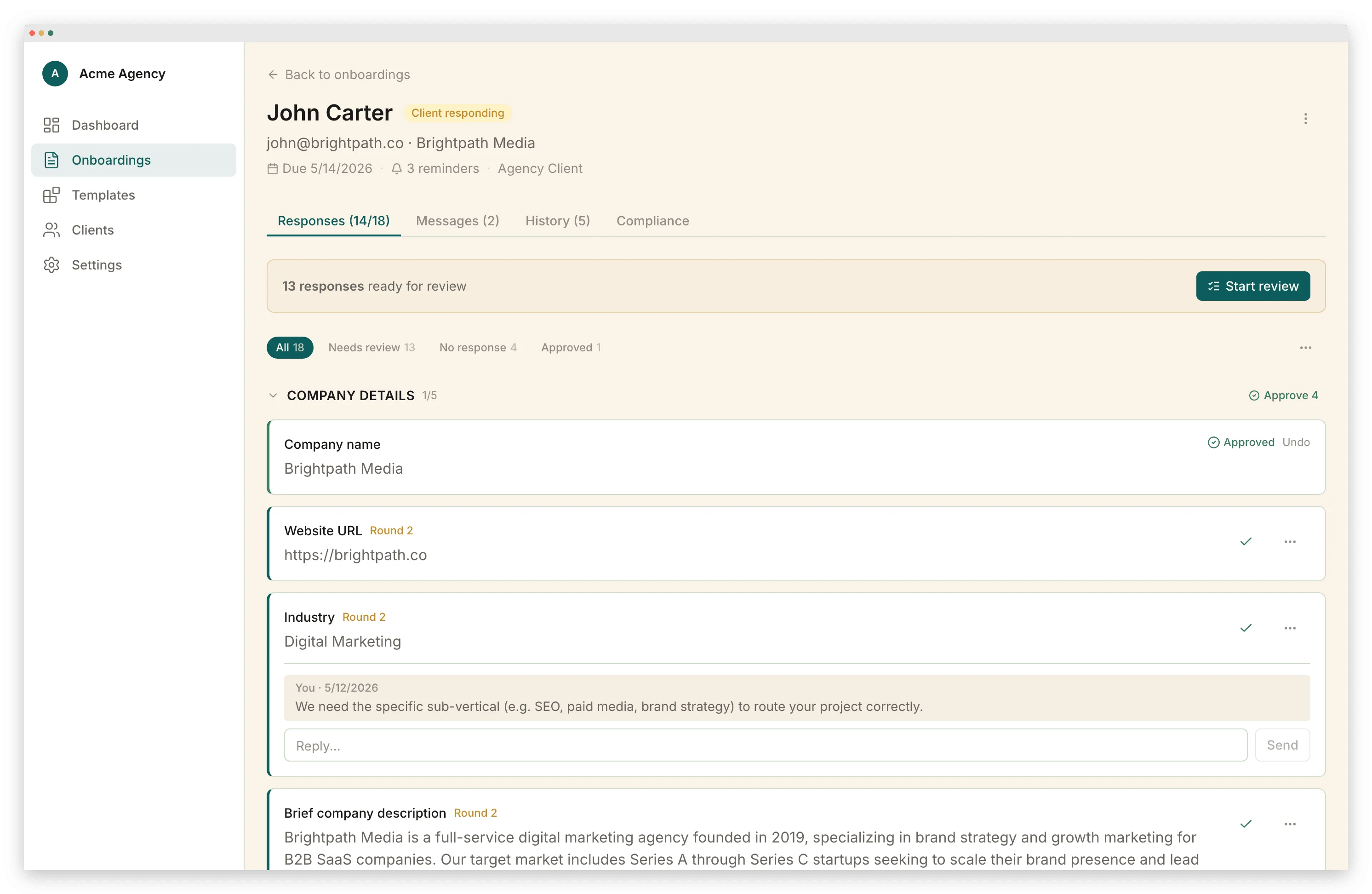
A checklist written on paper is a starting point. A checklist that runs itself is the goal. The progression looks like this:
- Document it. Write down every step you currently do when onboarding a client, including the steps you sometimes skip. If you want a head start, grab our checklist template with copy-ready versions by industry.
- Sequence it. Order the steps by dependency. Identify what cannot start until something else finishes.
- Templatize it. Create reusable templates for contracts, intake forms, welcome emails, and document requests. Build variations for different client types or service tiers.
- Automate it. Connect the steps so that completing one triggers the next. Contract signed → intake form sends. Intake completed → document request sends. All documents received → kickoff scheduling email sends.
- Measure it. Track how long each phase takes, where clients stall, and where your team spends the most time. After 10 clients, your bottlenecks will be obvious.
Most service businesses are stuck between steps 1 and 2. They carry a mental checklist and a rough sequence, and none of it runs without them in the room. Step 2 to step 4 is the jump: onboarding stops being something you perform and becomes something that runs. Client onboarding software exists to make that jump possible without building everything from scratch.
For teams ready to make that jump, a dedicated onboarding platform holds contracts, intake forms, document collection, payments, and automated triggers in one flow. Each phase hands off to the next on its own. Nobody on your team has to send the follow-up.
Avoiding the Most Common Mistakes
If you've read this far and your current onboarding process is "send a welcome email and hope for the best," you have work to do. The good news: the most damaging onboarding mistakes are also the most fixable. We've written a detailed breakdown of the 10 most common client onboarding mistakes — including the ones that cost the most money and the ones that are hardest to spot.
The short version: document everything, set deadlines for every request, fill the silence after contract signing, and ask for feedback before you assume everything went well. Firms that run onboarding as a system keep more clients and get paid sooner. They also spend less time on the administrative work that nobody started a business to do.
Vlad Kuzin
Founder of Portico. Former content systems architect. Obsessed with removing friction from client workflows.
Onboard your next client with one link
Intake forms, documents, e-signatures, and payments in a single guided flow.
Start FreeNo credit card required. Cancel anytime.