Best client portal software (2026)

The best client portal software for service businesses combines document collection, intake forms, e-signatures, payment processing, and white-label branding in a single client-facing flow, costing between $35 and $150 per month. According to Wyzowl's onboarding research, 63% of customers consider the post-sale experience when deciding whether to buy in the first place. If your onboarding is a tangle of Google Drive links, DocuSign emails, and Stripe payment pages, you are losing clients before you start the actual work.
This guide skips the alphabetical listicle format. It covers what a client portal actually is, as distinct from a project management tool or CRM. Then the six features that separate useful portals from checkbox marketing. Then the four evaluation mistakes that waste months, and a five-step framework for testing any tool against your real workflow. For a ranked comparison of the top options, see our client portal software page.
What a Client Portal Is and What It Is Not
A client portal is a secure, branded space where your clients complete tasks you assign them: uploading documents, filling out forms, signing contracts, making payments, and checking progress. The client sees a guided flow. You see a dashboard tracking who has finished and who is stuck.
Three tools get confused with client portals constantly:
| Client Portal | Project Management Tool | CRM | Shared Drive | |
|---|---|---|---|---|
| Built for | Client-facing tasks | Internal team tasks | Sales pipeline | File storage |
| Who uses it | Your clients | Your team | Your sales team | Anyone with a link |
| Intake forms | Yes, with conditional logic | No | Basic contact forms | No |
| E-signatures | Built-in | No | Add-on only | No |
| Payments | Embedded in flow | No | Add-on only | No |
| Branding | Full white-label | Your team's workspace | CRM's interface | Google/Dropbox branded |
| Client sees | Only their tasks | Your internal boards | Their deal record | A folder |
Pick the wrong category and you lose months. A bookkeeping firm that gives clients access to a Trello board is not running onboarding. It is exposing internal workflow and hoping clients work out what to do. A design agency sharing a Google Drive folder is not collecting documents. It is praying that clients name files correctly and drop them in the right subfolder. Hope is not a process.
Client portal software is purpose-built for the external handoff: the part of your workflow where the client needs to act. Project management tools handle what your team does internally. CRMs track sales pipeline and contact data. Shared drives store files without structure. If you need clients to upload documents, sign agreements, and pay you in a guided sequence, you need a client portal, not a project management tool with a client-facing view bolted on.
The Six Features That Separate Real Portals From Marketing Checkboxes
Every client portal tool claims to "do everything." These six capabilities decide it. Either the tool works for a service business running 5 to 20 onboardings per month, or you are back to email within a quarter.
1. Document collection with per-item status tracking
Your portal should let you request specific files by type (PDF, PNG, CSV), name each request ("Q4 2025 bank statement," "W-9 form"), and show per-item status: not started, submitted, under review, approved, or rejected with a note. That is not a generic file upload area. A box that says "drag files here" gives you a pile of unnamed attachments and the job of sorting them by hand.
McKinsey's 2012 research on knowledge work found that employees spend 1.8 hours per day searching for and gathering information. The same hunt happens when client documents sit in email threads, Slack messages, and shared drives. Each client uses whichever channel feels easiest to them.
2. Intake forms with conditional logic
Flat forms with 30 fields are a bad experience. Conditional logic shows or hides fields based on earlier answers. Select "sole proprietor," and the section on corporate officers disappears. Choose "existing client," and the welcome questions never appear.
Multi-service businesses need this most. A bookkeeping firm onboarding a tax-only client needs different information than one taking on monthly bookkeeping plus payroll. One form with branching logic replaces six separate forms. The client sees only the fields that apply.
Test this during evaluation. Build your actual intake form in the tool. If the conditional logic is limited to showing/hiding individual fields (and cannot branch entire sections), you will hit the ceiling within a month.
3. Built-in e-signatures
If your onboarding involves contracts, engagement letters, NDAs, or consent forms, signatures must be native to the portal, not a redirect to DocuSign or HelloSign. The moment a client leaves your portal to sign somewhere else, the guided flow is over. They create another account. They switch context. Your "single onboarding experience" now has three different URLs.
E-signatures are legally enforceable across all 50 states under the ESIGN Act (signed into law June 30, 2000) and the Uniform Electronic Transactions Act, adopted by 49 states. There is no legal reason to require wet-ink signatures for standard service agreements, engagement letters, or NDAs.
Built-in e-signatures are the single feature that most clearly separates a client portal from a document collection tool. If your portal does not include signatures natively, you are still sending clients to a second platform: a second login, a second notification email, and a second point of failure. For any service business that uses contracts or engagement letters, e-signatures must be in the same flow as document collection and payment.
4. Payment collection embedded in the flow
Collecting a deposit, retainer, or first invoice as part of onboarding is standard in service businesses. A portal that cannot take payment means a separate Stripe link or PayPal invoice. Another email. Another click. Another chance for the client to stall.
Embedded payments (typically Stripe-powered) let the client fill out their information, sign the agreement, and pay in one session. Payment should be a step in the sequence, not a separate module the client has to go find.
5. White-label branding beyond a logo swap
McKinsey's research on personalization found that 71% of consumers expect personalized interactions, and 76% get frustrated when that expectation is not met. For service businesses, the onboarding experience is the first post-sale interaction a client has with your brand. A portal wearing someone else's logo in the corner undercuts the professionalism you sold during the pitch.
At minimum: custom logo, brand colors, and a custom domain or subdomain (portal.youragency.com). Better tools let you brand email notifications, the login page, and individual onboarding flows per client type. Go through the client-facing experience yourself. If the tool's branding is louder than yours, it is their portal, not yours.
6. Automated reminders with escalation
The best portal is useless if your client never completes it. Automated reminders by email and SMS fire when items go overdue. That is the difference between 90% completion in 5 days and 60% completion in 3 weeks.
Look for configurable reminder sequences: a gentle nudge at day 3, a firmer follow-up at day 7, and an escalation to phone at day 10. If you are onboarding 15 clients per month, you cannot track overdue items in your head. Nor should you spend Friday afternoons chasing clients for documents instead of doing billable work.
The Four Evaluation Mistakes That Waste Months
Most service businesses spend 2 to 4 weeks evaluating portal tools, pick one, spend another month setting it up, and then realize it does not actually fit their workflow. These are the four mistakes that cause that cycle.
Mistake 1: Treating a project management tool as a client portal
Trello, Asana, Monday, and Notion are built for your team, not your clients. They lack intake forms, e-signatures, and payment collection. They expose internal project structure. And they force clients to learn a tool designed for a different purpose. If a client needs a tutorial to find where to upload a document, the category is wrong. For more on this failure mode, see 10 client onboarding mistakes that cost you time and money.
Mistake 2: Over-indexing on feature count
Platforms like HoneyBook and Dubsado bundle CRM, invoicing, project management, scheduling, email marketing, and a client portal. It sounds powerful until you realize the portal is a checkbox feature, not the core product. A HoneyBook alternative or Dubsado alternative that leads with onboarding avoids this. Both HoneyBook and Dubsado include client portals, but their primary focus is CRM and business management. If client-facing onboarding and document collection is your main pain point, choose a tool where that is the primary product.
The tool with the longest feature list is rarely the best fit. A platform that does CRM, invoicing, scheduling, email marketing, and client portals does all of them at 60%. A purpose-built portal tool does one thing (the client-facing handoff) and does it at 95%. Match the tool to your actual bottleneck, not to a fantasy of replacing every tool in your stack.
Mistake 3: Evaluating only the admin side
It is easy to fall for a clean dashboard and flexible settings. But the admin experience is half the product. The client experience decides whether clients finish the flow or stall and push you back to email.
During your trial, build a real onboarding flow and send it to someone outside your team. Watch for: Does it require account creation? Does it work on mobile? Can the client save progress and return later? Is it obvious what to do next at every step? A beautiful admin dashboard cannot rescue a confusing client experience. Completion rates will be low, without exception.
Mistake 4: Falling into pricing traps
Three pricing models dominate the market, and two of them punish growth:
| Pricing Model | How It Works | Who Gets Hurt |
|---|---|---|
| Per seat | $15 to $30 per user per month | Teams of 5+ where everyone needs access. A 10-person agency pays $150 to $300 per month before touching any features. |
| Per client | Charge per active client or onboarding | Businesses scaling beyond 20 clients/month. Success becomes expensive. |
| Usage tier | Flat fee for a tier of active onboardings, unlimited seats | The most predictable. Your cost scales with volume, not headcount. |
Dubsado charges $25 to $60 per month for additional users beyond the first three. HoneyBook raised all plan prices by 63 to 89% in February 2025. Starter went from $19/month to $36/month. In accounting, TaxDome's annual contracts run $800 to $1,200 per seat per year, which is why flat-rate TaxDome alternatives keep appearing on firm shortlists. Those changes land on your unit economics if you planned around a specific monthly cost.
Total the cost at your current team size and your 12-month projected client volume. Sticker price is not cost.
A Five-Step Framework for Choosing
This framework works for any service business type. After the steps, there is a worked example showing how a bookkeeping firm would apply it.
Step 1: Map your current onboarding process
Before evaluating any tool, write down every step of your existing flow. Every email, every document request, every form, every signature, every payment. Count them. A typical agency onboarding involves 8 to 12 distinct client touchpoints. A bookkeeping firm collecting tax documents runs 15 to 20. This list becomes your requirements spec.
If you need a starting template, the client onboarding checklist breaks this into seven phases with specific action items by industry. For the full process behind the checklist, see our onboarding guide.
Step 2: Identify where clients stall
Where do clients go dark? Where do documents go missing? Where do you spend the most time following up? These bottlenecks define what your portal must solve first. If chasing missing documents is your biggest problem, strong automated reminders matter more than a built-in scheduler.
Step 3: Build your actual workflow in the trial
Do not click around the demo. Build your real onboarding flow (your actual forms, your actual document requests, your actual payment step) and send it to yourself. Then send it to a colleague or a friend who has never seen the tool. If they get confused at any step, your clients will too.
Step 4: Check the economics at scale
Price the plan you need today and the plan you will need in 12 months. Onboarding 8 clients per month now and expecting 20 by next year? Check that the jump between tiers does not double your cost. Check for hidden fees: per-user charges, SMS costs, storage limits, and payment processing percentages on top of Stripe's standard 2.9% + $0.30.
Step 5: Assess development trajectory
Check the tool's changelog or release notes page. A tool that has not shipped a meaningful update in six months is in maintenance mode. You are choosing a platform that shapes your client's first impression of your business for years. Pick one that is still actively building.
Worked Example: A Bookkeeping Firm Evaluating Portals
Here is how a 6-person bookkeeping firm (3 bookkeepers, 1 admin, 2 principals) running 12 new client onboardings per month would apply the framework.
Step 1: Map the process: Their current workflow involves 14 steps across email, Google Drive, DocuSign, and Stripe:
- Send engagement letter through DocuSign (wait 1 to 3 days)
- Email intake questionnaire as a Google Form (wait 2 to 5 days)
- Email document request list (W-9, bank statements, prior year returns, QuickBooks access)
- Receive documents by email or Google Drive (chase 60% of clients for missing items)
- Send Stripe invoice for first month retainer
- Internal setup in QuickBooks
- Welcome call
Step 2: Find the bottleneck: Document collection is the bottleneck. 60% of clients need 2 to 3 follow-up emails for missing items. Each follow-up cycle takes 3 to 5 business days. Average time from signed engagement letter to "all documents received": 11 days. Target: 5 days.
Step 3: Build and test: They build the full flow in two trial tools. One requires clients to create an account. The firm's clients (small business owners, including clients over 50) abandon the registration step 30% of the time. The other lets clients access the portal through a magic link with no account required. They choose the second.
Step 4: Check economics: 6 team members, 12 onboardings/month, growing to 20.
- Tool A: $85/month (5 users included, $10/extra user) = $95/month now, same at 20 onboardings
- Tool B: $55/month base + $25/month for 4 to 10 users = $80/month now, same tier covers growth
- Tool C: $100/month for up to 25 onboardings, unlimited seats = $100/month now and at scale
Tool C costs more today but has no user surcharges and covers growth. Total 12-month cost is lowest.
Step 5: Check trajectory: Tool A last updated 4 months ago (new integration). Tool B last updated 7 months ago (UI refresh, no new features). Tool C ships monthly updates with a public changelog. The firm chooses Tool C.
When evaluating client portal tools, build your actual onboarding workflow in each trial, not a test project. Use your real intake form, your real document list, and your real payment step. Send the flow to someone outside your team and watch where they stall. The admin dashboard tells you half the story. The client experience tells you the rest.
What a Modern Client Portal Should Feel Like
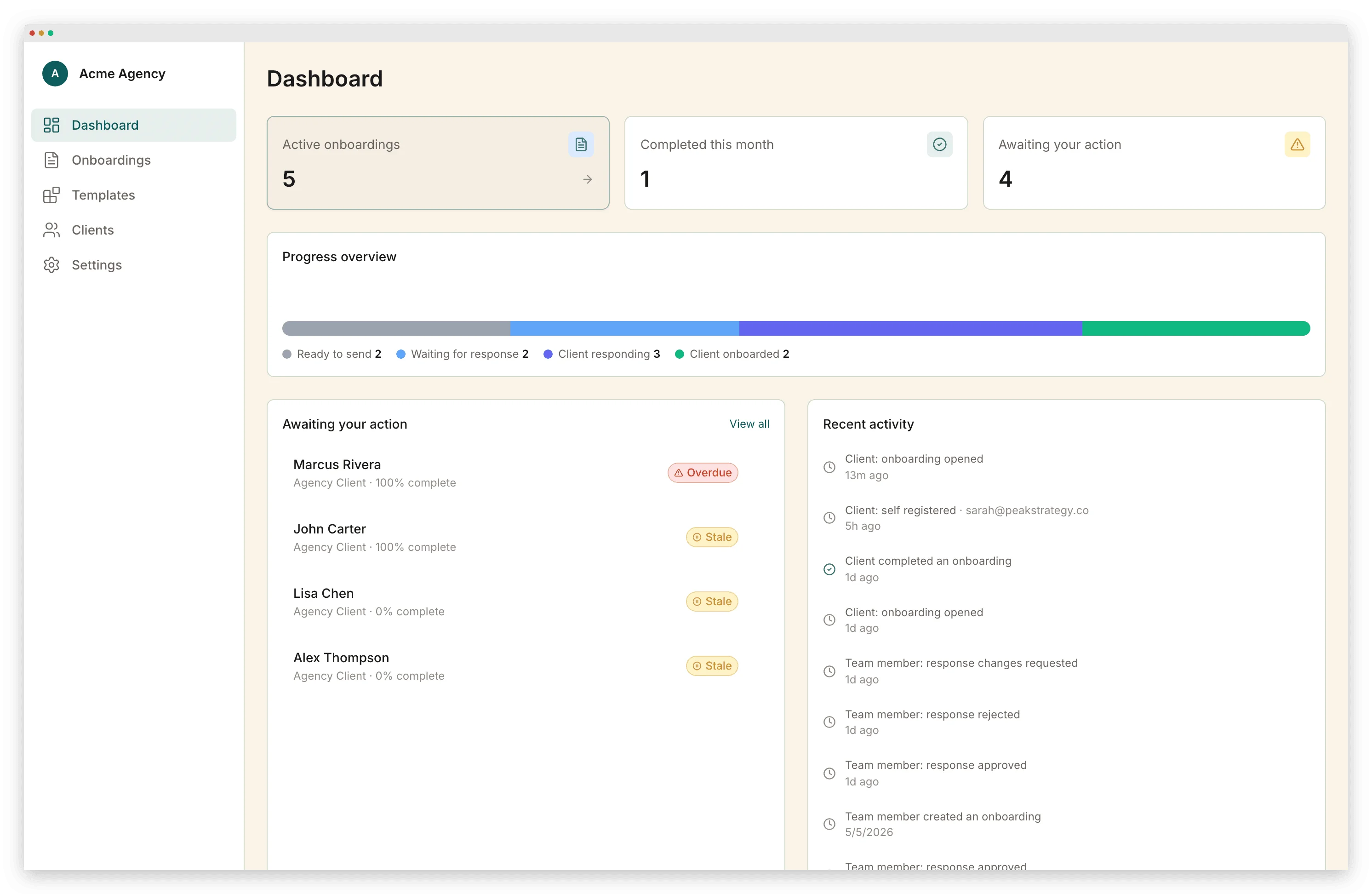
The bar has moved. Clients in 2026 expect the polish they get from consumer apps: fast load times, mobile-friendly layouts, clear progress indicators, and no unnecessary friction. If your portal looks like it was built in 2018, clients will assume the service is too.
A good portal feels like a guided walkthrough, not a pile of tasks. The client always knows: what to do next, how far along they are, and who to contact if stuck. Progress should be visible: "step 3 of 6" is more motivating than an unchecked list of 12 items.
This site's portal tool is built around that principle. One branded flow where clients complete intake forms, upload documents, sign contracts, and make payments in sequence. Automated reminders handle the follow-up. Whichever tool you choose, the design test is the same. If a client can complete your entire onboarding from a phone in one sitting, you chose well.
Pricing Snapshot: What Client Portal Tools Cost in 2026
Real pricing from vendor websites, checked May 2026. Monthly billing rates (annual billing is 15 to 25% lower).
| Tool | Entry Plan | Mid Plan | Upper Plan | Pricing Model | E-Signatures | Payments |
|---|---|---|---|---|---|---|
| Content Snare | $42/mo (2 users, 20 requests) | $85/mo (5 users, 50 requests) | $143/mo (10 users, 100 requests) | Per request + per seat | No | No |
| Dubsado | $35/mo (Starter) | $55/mo (Premier) | Extra users: $25 to $60/mo | Per plan + per-user add-ons | Yes | Yes |
| HoneyBook | $36/mo (Starter) | $59/mo (Essentials) | $129/mo (Premium) | Flat per plan | Yes | Yes (2.9% + $0.25 fee) |
| Clustdoc | €190/mo (3 users, 50 apps) | Custom (5+ users) | Custom (10+ users) | Per application + per seat | Yes (limited on Pro) | No |
| Portico | $39/mo (Starter) | $79/mo (Growth) | $149/mo (Scale) | Per active onboarding, unlimited seats | Yes | Yes |
Content Snare excels at document collection but lacks e-signatures and payments. You still need DocuSign and Stripe alongside it. Dubsado and HoneyBook are CRM-first platforms with portal features attached. Clustdoc targets compliance-heavy onboarding but starts at €190/month, pricing out most small teams. For accounting-specific guidance, see our portal guide for accountants, the bookkeeper-specific guide, or the financial-advisor edition.
Compare total cost, not sticker price. A $35/month tool that charges $25/month for additional users, plus $15/month for e-signature add-ons, plus Stripe fees on a separate payment link, costs more than a $79/month tool that includes all of those natively. Calculate the real number for your team size and monthly client volume before deciding.
The Decision Checklist
Before you commit, score each tool you are considering against these ten criteria. Any "no" on the first five is a dealbreaker for most service businesses.
Must-haves:
- Can you build your actual onboarding flow in the tool (not a simplified demo version)?
- Do clients complete the flow without creating an account or installing anything?
- Does the tool include e-signatures natively (not a redirect to a third-party signing tool)?
- Can clients upload specific named documents with per-item status tracking?
- Are automated reminders configurable (timing, frequency, channel)?
Strong preferences:
- Is payment collection embedded in the onboarding sequence?
- Can you white-label the portal with your domain, logo, and colors?
- Does the pricing model avoid per-seat charges?
- Does the tool work on mobile without a degraded experience?
- Has the product shipped a meaningful update in the last 90 days?
A tool that hits all ten is rare. One that hits the first five and at least three of the second five is enough. That tool will serve a 3 to 20 person service business for the next 2 to 3 years.
Frequently Asked Questions
What is client portal software?
Client portal software gives your clients a secure, branded space to share files, fill out forms, sign documents, make payments, and track progress, all without back-and-forth emails. It replaces the patchwork of Google Drive links, PDF attachments, and Slack threads that most service businesses default to. The key differentiator from project management tools: a client portal is designed for the external handoff (what the client sees and does), not internal team coordination.
Do I need a client portal if I already use project management software?
Usually, yes. Project management tools like Asana, Trello, and Notion are built for internal teams, not client-facing workflows. They expose too much of your process and lack features like intake forms, e-signatures, and payment collection. A client portal is purpose-built for the external handoff. Giving a client access to your Asana board is not onboarding. It is showing them your messy kitchen.
How much does client portal software cost?
Pricing varies by feature depth. Basic document collection tools start around $29 to $42 per month. Full-featured platforms with e-signatures, payments, conditional logic, and branding run $55 to $190 per month. Avoid per-seat pricing. If your whole team needs access, per-seat models get expensive fast. The most sustainable pricing charges based on active onboardings per month with unlimited team seats.
Can I white-label a client portal with my own branding?
Depth varies significantly across tools. At minimum, look for custom logo, brand colors, and a custom domain or subdomain (portal.youragency.com). Better tools let you customize email templates, the login page, and individual onboarding flows. If brand perception matters to your business, test the client-facing experience before buying. Tools that advertise "branding" may only let you swap the logo while keeping their own UI chrome.
What is the difference between a client portal and a customer portal?
They solve different problems. Customer portals are common in SaaS and e-commerce: they let users manage subscriptions, view order history, or submit support tickets. Client portals are built for service businesses where the relationship is ongoing, collaborative, and involves document exchange, approvals, and project-specific communication. If you are an agency, accountant, or consultant, you need a client portal, not a customer portal.
Vlad Kuzin
Founder of Portico. Former content systems architect. Obsessed with removing friction from client workflows.
Onboard your next client with one link
Intake forms, documents, e-signatures, and payments in a single guided flow.
Start FreeNo credit card required. Cancel anytime.